Add device
Purpose
Register a single gateway by hand, for example a test gateway you have in front of you, without an order or a manufacturing CSV. Gateways you ordered from a manufacturer are claimed instead, with their claim codes or order number: see Bulk import and claim.
A device added here is identified by its TPM, with one registered identity: its AK fingerprint, or the gateway's own identity certificate, see Register a device's identity. If you want more, the gateway can also be required to present a device certificate from your own CA: see Optional: require a device certificate from your CA.
Prerequisites
- Signed in, see Sign in.
- The role Org Admin or Editor. Viewers cannot add devices by hand. Changing a device's identity later is for Org Admin only, see Edit device.
- The gateway's EUI and serial number, both on its label.
- The gateway's AK fingerprint: 64
characters, digits
0–9and lettersa–f. It comes from the manufacturer, in the batch list delivered with the gateways or on the label. This form does not compute it for you. Without it from the manufacturer, Register a real gateway shows the two ways to get it yourself; what exactly it is is below.
Steps
-
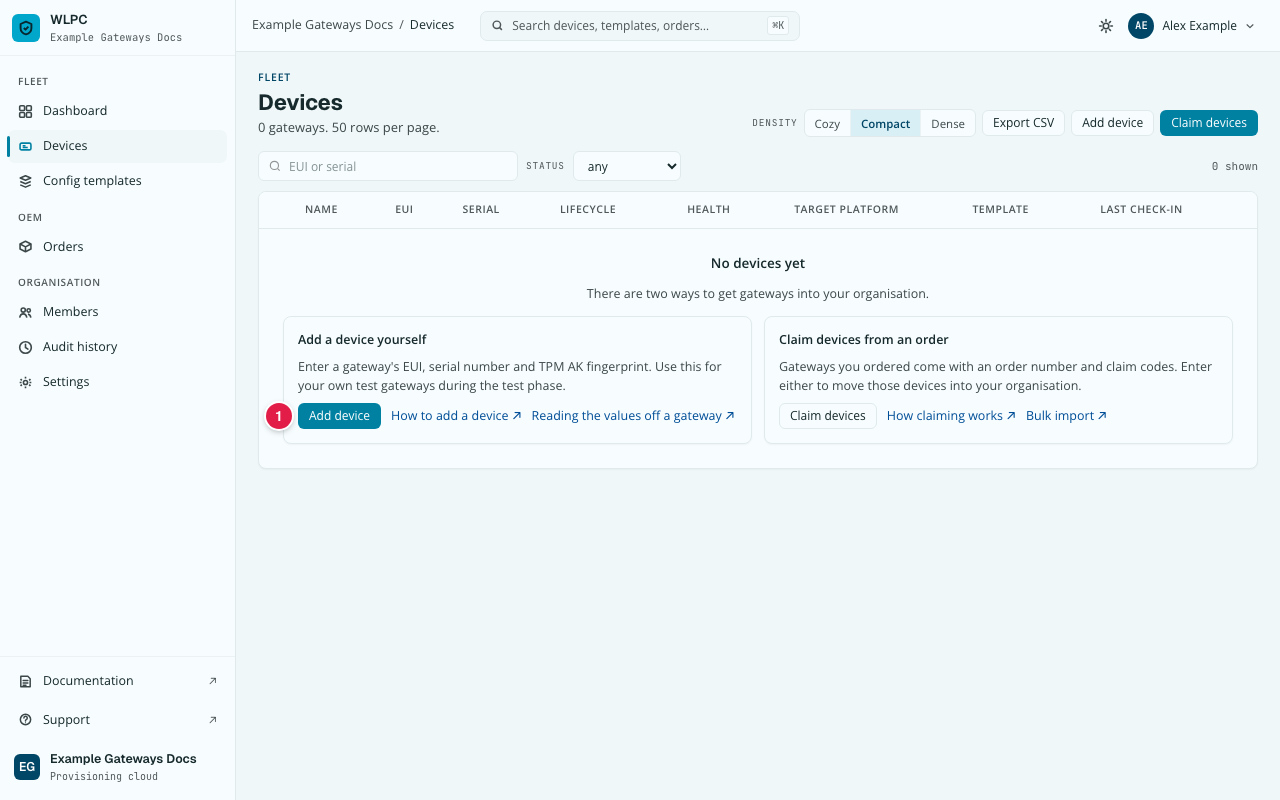
Go to Devices, then click Add device. With no devices yet, the button is also inside the "Add a device yourself" box.
-
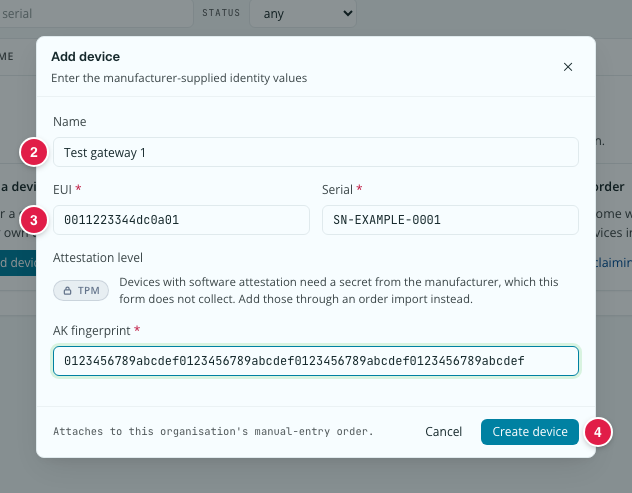
The Add device dialog opens: "Enter the manufacturer-supplied identity values". Fill in the fields (see the table below), then click Create device.
-
Give the device its template, see Assign template.
Field table
| Field | Required | Format | Notes |
|---|---|---|---|
| Name | No | Free text | Anything that helps you recognise the gateway. |
| EUI | Yes | 16 characters 0–9, a–f; colons, dashes, dots and spaces are allowed (e.g. 00:00:00:00:00:00:00:01) |
Stored and shown as 16 lowercase characters without separators (0000000000000001). |
| Serial | Yes | Free text | Not checked against a pattern here, unlike the CSV import in Bulk import and claim, which can require one. |
| Attestation level | — | Fixed to TPM | Shown as a locked TPM badge, not a choice. The dialog's own hint: "Soft attestation requires a manufacturer device_secret, which this form does not collect — use order/CSV import for a soft-attested device." |
| AK fingerprint | Yes, unless you choose Identity certificate under Identity (details) | 64 characters 0–9, a–f |
From the manufacturer (batch list or label). The SHA-256 of the public part of the gateway's attestation key, defined below. It identifies the gateway; it is not a secret. See How device identity works. |
The AK fingerprint, exactly
The AK fingerprint is the SHA-256 over the AK's TPMT_PUBLIC, without the
TPM2B size prefix, written as 64 lowercase hex characters. The AK is the
attestation key the Bootstrap-Agent derives in its TPM; TPMT_PUBLIC is the
TPM's own encoding of that key's public part. TPM tools usually write it as
a TPM2B_PUBLIC: the same bytes with a 2-byte size in front. Those two
bytes are not part of the fingerprint.
Worked example with tpm2-tools. The commands are the ones from Register a real gateway, option B, where the TPM slot rules are explained. The output shown here comes from a software TPM, so the value is an example only; every TPM yields its own.
-
The key template's
uniquevalue, passed with-u, starts with a 2-byte length word. tpm2-tools reads that word little-endian:00 01means 256, the 256 zero bytes that follow. Written as01 00(big-endian), or left out, the TPM derives a different key. -
Derive the AK and export its public part.
-f tsswrites theTPM2B_PUBLIC: here 282 bytes, starting with the size word01 18. This one is the TPM's own encoding, big-endian: 0x0118 = 280, the length of theTPMT_PUBLICthat follows (it starts00 01, the key type RSA). -
Strip the 2-byte size prefix (
tail -c +3starts at the third byte) and hash the rest:That is the value to enter. Hashing
ak.pubwith its prefix gives a different value, which no gateway will ever match.
Optional: require a device certificate from your CA
By default a device added here is recognised by its TPM alone. If your gateways also carry a certificate from a CA you run or trust, Add device can require it too: the gateway must then prove both the certificate and its TPM key. Without such certificates, leave this off.
Under Additional check (optional): device certificate from a CA you upload the CA's public chain (or pick one uploaded earlier) and say where the EUI sits in the certificate. Without a revocation list (CRL) address, a revoked certificate keeps working. The gateway must present its certificate on its first connection, or it is refused.
Procedure and messages: Register your device CA. How a gateway is judged: How device identity works. Registering one certificate per device: Register a device's identity.
Expected result
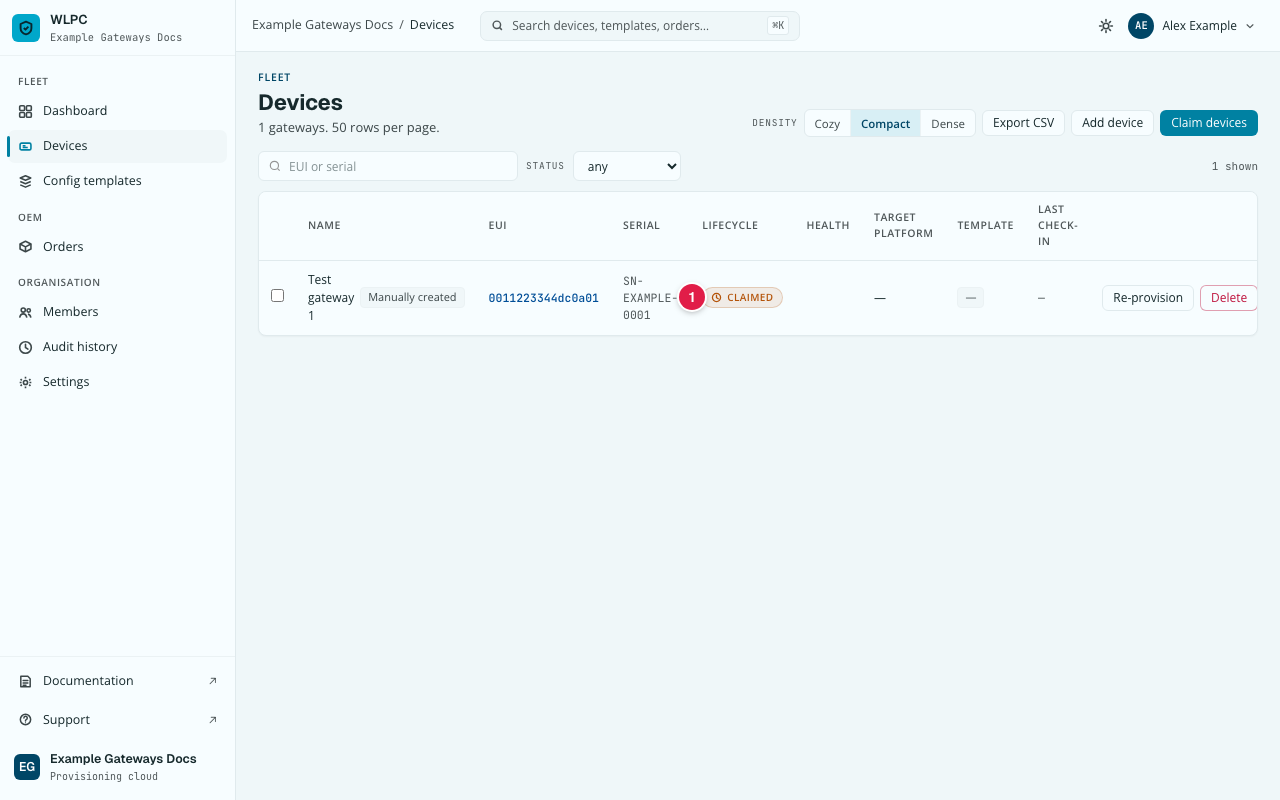
The dialog closes and the new device appears in the Devices list with the
badge Manually created, the status CLAIMED, and the EUI and serial you
entered. CLAIMED means the device is yours but the gateway has not been set
up yet; see First steps, step 8.
Common errors
| Exact UI message | What to do |
|---|---|
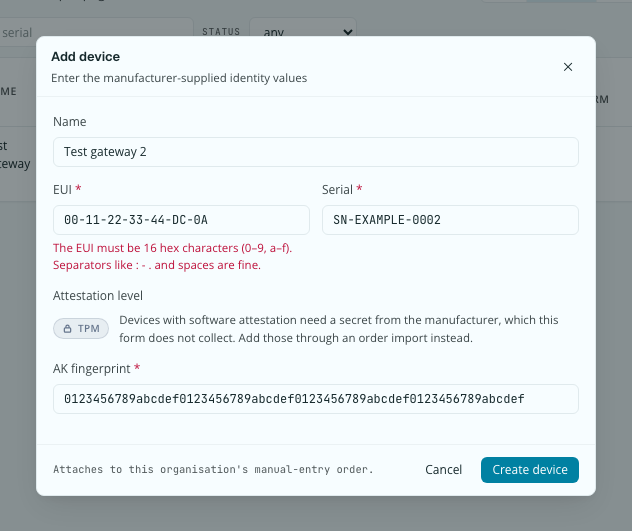
| "The EUI must be 16 hex characters (0–9, a–f). Separators like : - . and spaces are fine." | The EUI is too short, too long, or has a character other than 0–9, a–f. Check it on the label. |
Value error, ak_fingerprint must be 64 hex characters: lowercase_hex(SHA-256(ak_public_area)), Wire Contract v1.1 |
Copy the fingerprint again: exactly 64 characters, nothing before or after. |
a device with this eui already exists |
This EUI is already registered. Search for it (Ctrl+K, ⌘K on a Mac) rather than submitting again. |
| Add device is missing or refused | Your role is Viewer. Ask an Org Admin for the role Editor. |