How device identity works
This page has two parts:
- Part 1, for customers: what makes a gateway "genuine", and what you have to do for it (usually very little).
- Part 2, for manufacturers: who supplies what, which certificates a gateway carries, how the platform checks them, and what you deliver with each batch.
New here? Start with First steps; you do not need this page for them.
Statements marked in preparation describe something that is agreed but not yet in place.
Part 1: For customers
What makes a gateway genuine
Every gateway has a security chip, the TPM. The chip holds keys that are created inside it and never leave it.
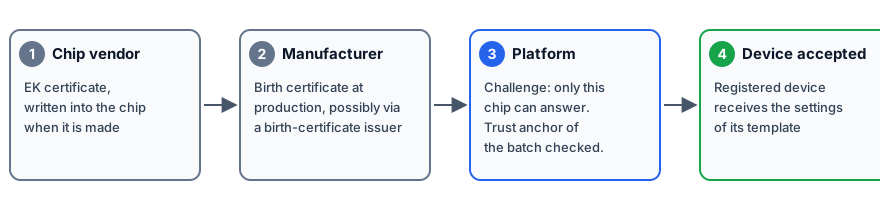
When the gateway calls the platform, the platform sets it a task that only that one chip can solve. It does this at the first start and again at every check-in. A gateway is accepted only when all of this is true:
- It solves the task. A copy of the gateway software on other hardware cannot.
- Its batch vouches for it: because the gateway is on the batch's list of known devices, through the manufacturer's certificate, or through its device identity certificate (see Part 2).
- It is registered in an organisation, by its AK fingerprint.
Only then does it receive the settings of its template.
What you need to do
Why
So the platform knows which gateways belong to you.
You need
- For gateways from an order: the claim code or the order number from your manufacturer. Nothing else: no certificate, no fingerprint.
- For a gateway you add by hand: its EUI, its Serial and its AK fingerprint. You do not need the EK certificate, the birth certificate or any key.
Do this
- From an order: Devices → Claim devices, see Bulk import and claim.
- By hand: Devices → Add device, see Register a real gateway for where each value comes from.
You should see
The device in Devices with the status CLAIMED. After the gateway's
first start it moves on to PROVISIONED.
If not
| What you see | What it means | What to do |
|---|---|---|
The gateway stays CLAIMED, and support reports "device unknown" |
The AK fingerprint you entered does not match the gateway's chip. | Read it again, see Register a real gateway. |
The gateway is refused with CHAIN_INVALID |
Its batch does not vouch for it: the gateway is not on the batch's list, or the manufacturer's certificate is missing or does not fit. | Contact your manufacturer or support, see Troubleshooting. |
End customers need nothing from the manufacturer
Claiming a device takes a claim code or an order number, nothing else. You never see, handle or need a manufacturer certificate, CA or fingerprint.
This is a different thing from the target-platform credential (for example, an MQTT broker certificate). That one is set in a config template and reaches the device only after its identity has been proven as described here. One decides whether the device is genuine; the other is how the device then connects to wherever it operates.
Part 2: For manufacturers
Who supplies what
| Role | Supplies | When |
|---|---|---|
| Chip vendor | Endorsement key (EK) and its certificate, in the chip | Factory |
| Manufacturer / OEM | The device list per batch, and its trust anchor: the AK fingerprints (allowlist), or a device CA for its birth certificates, or the CA chain of its device identity certificates | Per batch |
| Platform operator | Chip-vendor root certificates | Once |
| End customer | A claim code (or order number) | Claiming |
The certificates on a gateway
| Certificate | Issued by | When | Checked by the platform? |
|---|---|---|---|
| EK certificate (endorsement key) | The chip vendor | When the chip is made | Yes, in device CA mode: it must chain to the chip vendor's root, which the platform operator loads once. Not in allowlist mode. |
| Birth certificate | The manufacturer, possibly through a birth-certificate issuer | At production | Yes, in device CA mode: it must chain to the device CA registered for the batch, be valid and not on a revocation list. In every mode, when it is present, its name must match the gateway's EUI. |
| Device CA chain (optional) | The manufacturer or its birth-certificate issuer | Once per CA generation | This is the trust anchor you register for a batch in device CA mode. It is not stored on the gateway for the platform. |
| Device identity certificate (if any) | The manufacturer or the customer's own CA | At production or later | Yes, when the batch uses the device identity certificate mode: see Device identity certificate. |
The gateway software reads the EK certificate from the storage location in the chip that the TCG standard defines. It reads the birth certificate from a storage location in the chip, set in the gateway software's configuration, and falls back to a file if that location is empty. Which location each manufacturer uses is in preparation: it is being confirmed with the manufacturer.
What never leaves the chip
The chip holds the endorsement key (EK), certified by the chip vendor, and the attestation key (AK). The gateway software creates the AK inside the chip as a restricted key: a key that can only sign data the chip itself produced. Both private keys are generated in the chip and never leave it: no private key is transmitted, backed up, or held by any person or service.
The AK fingerprint is not a secret
The AK fingerprint the platform records is a hash of the public part of the AK: an identifier, like a serial number. It proves nothing by itself and is never used as a shared key. Anyone who sees it learns nothing that lets them impersonate the device.
How the platform checks a gateway
1. The challenge (TCG credential activation)
The gateway sends its public attestation key and its EK certificate. The platform encrypts a random value so that only the chip holding that endorsement key, with that attestation key loaded, can decrypt it. Only an exact match is accepted. No private key leaves the chip and nothing secret crosses the network. This runs at the first start and at every check-in.
2. The trust anchor of the batch
Each order (batch) has one of three trust anchors, chosen by the OEM per order in the console.
| Allowlist (default) | Device CA | Device identity certificate | |
|---|---|---|---|
| You register | The AK fingerprint of every device | Your device CA certificate, or the chain up to its root | The public CA chain that issues the identity certificates |
| Device list needs | EUI, serial, AK fingerprint | EUI and serial | EUI and serial |
| The platform accepts | A gateway whose AK fingerprint is on the list. Certificates are not inspected. | A gateway whose birth certificate chains to that CA, is valid and not revoked, and whose EK certificate chains to the chip vendor's root | A gateway whose identity certificate chains to that CA and names its EUI, and, by default, also solves the chip's task |
Use the allowlist unless you have a CA to register. No birth-certificate CA is registered platform-wide yet (in preparation), so device CA mode works only with a CA you register on the order. One upload then covers a whole batch, and new devices need no list edit.
- A gateway without a matching trust anchor is refused.
- A birth certificate, when present, must name the device's EUI in every mode, and must not chain to another order's CA.
- Devices a customer adds by hand belong to that organisation's manual-entry order. It uses the allowlist; each AK fingerprint is added automatically.
Why per batch, not per device
A manufacturer's CA can change between production generations ("G1" superseded by "G2") or issue through an intermediate. Per batch, each batch names the CA generation its devices chain to, so a new CA does not break older batches.
3. What's checked
On upload, a CA certificate must:
- be a valid X.509 certificate with
CA:TRUE, not expired; - use RSA of at least 2048 bits or ECDSA P-256/P-384/P-521 (Ed25519 is refused here, though other upload paths on this platform accept it);
- not carry a SHA-1 signature.
An upload with any private-key material is refused before anything is parsed. The console shows the parsed fields and the SHA-256 fingerprint before you confirm.
A single CA certificate is enough. For a chain through an intermediate, upload the whole bundle in one file (device-facing CA first, up to a self-signed root); the platform verifies that each link was signed by the next. See Register your device CA.
On every check-in the platform repeats the challenge, then, by mode:
- Allowlist: the AK fingerprint against the list; no certificate chain.
- Device CA: also that the EK chains to a chip-vendor root; that the birth certificate chains to the order's CA, is within its validity and is not on the manufacturer's revocation list (CRL), when one is declared (published by the device CA's issuer, not the chip vendor: a separate trust chain); and that its name matches the device's EUI.
- Device identity certificate: see Device identity certificate.
Any mismatch returns CHAIN_INVALID.
The chain is checked before authentication, before any order is known, so the
check cannot reveal whether a device exists. Admission is then cross-checked
against the device's own order: a birth certificate that chains to order B's
CA is refused (CHAIN_INVALID) at order A, even within the same organisation.
Other causes: Troubleshooting;
upload rules: Register your device CA.
4. Device identity certificate
An ordinary X.509 certificate on the gateway, with its private key in the TPM, presented when it connects; the issuing CA can be the manufacturer's or your own. Use it when your gateways already carry one, instead of registering a birth-certificate CA or listing every AK fingerprint.
The certificate issuer provides
- The public CA chain: the issuing CA, optionally each issuer up to the root. Certificates only; a private key is refused before anything is sent.
-
Where the EUI is in each device certificate, one of:
Setting The EUI is… Example Subject common name (default) the whole common name, as EUI-48 or EUI-64 70B3D5A1B2C3Alternative name (URI) the last part of a URI urn:example:gw:70B3D5A1B2C3Alternative name (DNS) the first label of a host name 0000000000000002.gw.exampleSubject serial number the whole serialNumber attribute 0000000000000002 -
Optionally a revocation list (CRL) address; when set, a revoked certificate is refused.
Policies
- Certificate + TPM (default): certificate and the chip's task. A copied certificate is useless without the chip.
- Certificate only: a valid certificate suffices. Choose it only when the issuer checks at every issuance that the key was created in and never leaves the gateway's TPM. Switching needs an explicit confirmation and is recorded in the audit history.
When the certificate cannot be used
- Missing or expired, or the batch's revocation list cannot be fetched: the gateway may still prove itself with its chip, but only if it has authenticated successfully before with that same chip. Otherwise it is refused.
- Revoked, from another CA, or naming another device: refused, no fallback.
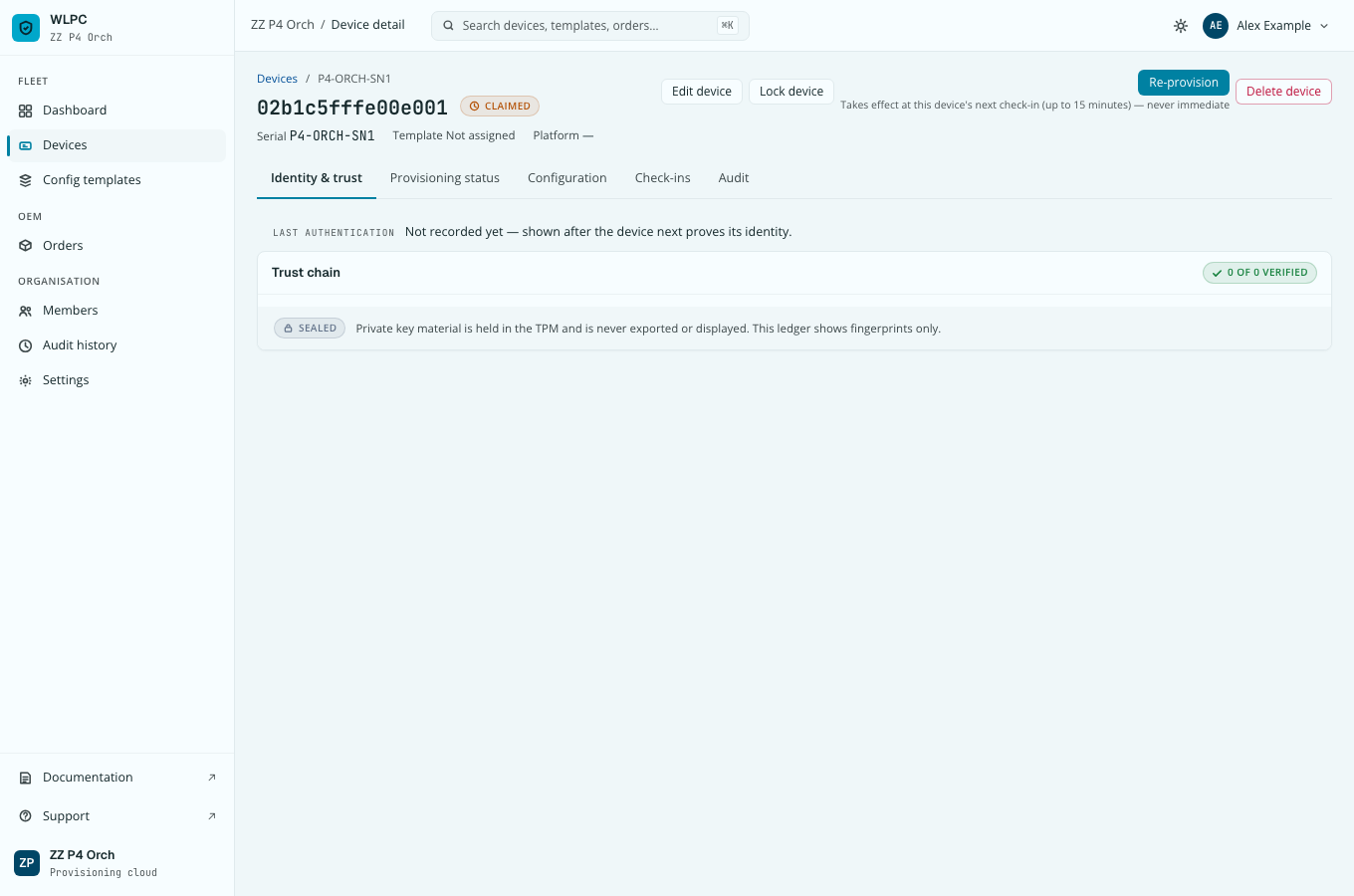
On the device page. Identity & trust shows Last authentication, for example "Certificate + TPM", "Certificate", or "TPM (fallback: certificate expired)", with the certificate's fingerprint in the tooltip.
Steps in the console: Register your device CA.
5. The device record
The gateway must also be registered, by its AK fingerprint, in an organisation: through your device list and a claim, or added by hand.
What you deliver per batch
- The device list: one row per device with serial number and EUI, and, in allowlist mode, the AK fingerprint. See the CSV columns in Bulk import and claim.
- The trust anchor: the list of AK fingerprints (allowlist), your device CA certificate (or the chain up to its root), or the CA chain of your device identity certificates. Register it on the order, see Register your device CA.
- Only public data. Certificates and fingerprints are public. Never send a private key. An upload that contains private-key material is refused before anything is stored.
No PKI of its own
The platform runs no certificate authority and issues no device certificates. It only checks the certificates that the chip vendor and you put on the gateway. Confirm the fingerprint of the CA you register with the people who issued it, through a second channel.
FAQ
Does the platform use our gateway identity certificate? Yes, when the batch uses the device identity certificate mode. Register the issuing CA chain on the order and choose where the EUI is; see Device identity certificate.
Does a customer ever need our certificates? No. Customers claim with a claim code or order number, or add a device with its EUI, serial and AK fingerprint. See End customers need nothing from the manufacturer.
Why per batch and not per device? See Why per batch, not per device.